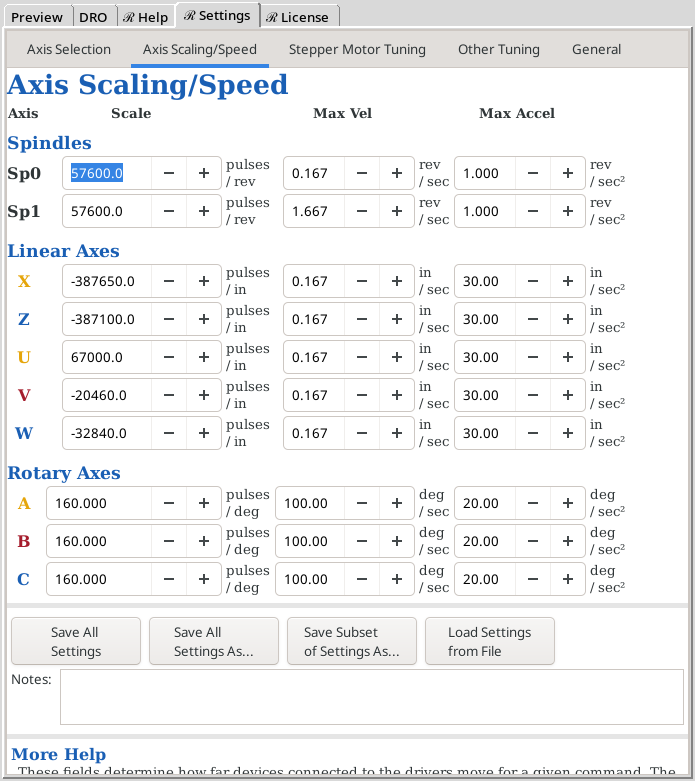
There are 3 values set for each axis on this screen.
| Scale
| This represents the number of pulses which must be sent to the stepper motor to achieve the desired movement. For example, in the screen to the right, 57,600.0 pulses are required for the Sp0 spindle to revolve 360°. There is more, in-depth information at Axis Settings for a Device?.
| Scale and Max Vel are inter-related. Thusly, when a value is entered for either, a calculation is performed to ensure that a value has not been entered which is too large (which would trigger an error in LinuxCNC).
|
| Max Vel
| This represents the maximum velocity for the respective axis. Do note, this is measured in distance per second. Thusly, 0.167 revolutions / second = 10 revolutions per minute.
|
| Max Accel
| This represents the maximum acceleration for the respective axis. Do note, this is measured in distance per second2.
| No calculation is performed to ensure the entered value is proper.
|
The system used for building screens in LinuxCNC has some quirks. Thusly, when making changes to any of these values,
- To change a value, you must have the mouse over that field.
- To have the system accept the value you entered, you must depress the Enter key after entering the value.
There are some comments at the bottom of the screen which outline some guidance, and best practices, for setting these. You may have to scroll up to see the values.
The buttons at the bottom of the screen are covered below.
|
| This is used to make a backup of all the current values you have entered. The data are saved to the default file, REBset_v1.ini in the directory, /home/reuben/Documents.
|
|
| This is used to save all the settings to a separate file. It is useful to take a backup of your settings ... just in case.
Do not save this as REBset_v1.ini. That is the file used by the system for the current settings, and anything there will be overwritten when you exit LinuxCNC.
|
|
| This is used to save a subset of the system settings. For each axis selected, you will need to have an assigned device name.
A scenario of the usefulness of this is:
- Your settings are correct for your cross slide on X & Z. You can save this as CrossSlide.REBset_v1.ini.
- You can then change the settings for a curvilinear slide (on axis Z), and save these as CurvilinearSlide.REBset_v1.ini.
- Then when you want to resume using your cross slide, Load the Settings from the file, CrossSlide.REBset_v1.ini
Do not save this as REBset_v1.ini. That is the file used by the system for the current settings, and anything there will be overwritten when you exit LinuxCNC.
|
|
| This is used to load the settings saved via one of the 3 options above. If the file is a portion of the settings, only those are loaded (e.g., if you want to load only the settings for a curvilinear slide).
|
Takes you to the page in this user manual which helps you determine the axis settings for a device?.
Notes:
|
Reboot Required
For any changes to take effect, a reboot is required.
|
- There are fields for setting the scales for all axes, including the ones not being currently used. The only ones used are for the axes being used.
- This panel is bigger than the screen. To scroll, you will need to use your mouse to move the bar on the right side of this panel. (The Glade system used by LinuxCNC does not accommodate the use of the mouse wheel.)
########## Standard Footer for all pages ##########