
How the Rose Engine Butler Programs Fit Together
Rose Engine Butler is not one program; instead, on the Rose Engine Butler system, there are four programs on the machine which work together. Each one has its own job, its own icon, and its own entry on the Applications menu. They are related, because they all work on the same machine and share the same settings, but they are independent: each one is started on its own, and none of them starts the others.
Knowing which program does what is the key to finding your way around the system. If you are looking for a setting and cannot find it on the Rose Engine Butler screen, it is almost certainly in the Rose Engine Butler Settings program.
Programs on the System
| Rose Engine Butler | Rose Engine Butler Settings | Backup Rose Engine Butler | Update Rose Engine Butler |
 Reuben's head |  The gear |  The USB Flash Drive |  The green up arrow |
| What it is: the machine control. It starts LinuxCNC with the Rose Engine Butler screens. | What it is: the setup program. It tells Rose Engine Butler what is connected to the box, and how each device behaves. | What it is: a program for copying key user files to a USB flash drive. | What it is: the software updater. |
Use it to:
| Use it to:
There are links on many pages in this program to the relevant pages of this User Manual. This is meant to help you understand how to best set the values to achieve what you want. | Use it to:
| Use it to:
This includes:
|
Programs on the Internet
There are also programs you can use which are on the Internet:
- Rose Engine Butler Library - the repository for documentation about Rose Engine Butler (https://RoseEngineButler.com).
- User Manual - the documentation system you are now looking at (https://manual.RoseEngineButler.com).
- Gcode Library - a library of Gcode programs which should be useful to the ornamental turner (https://gcode.RoseEngineButler.com).
- These have been vetted and documented to assist you in using them.
- To use one of the Gcode programs, save it to your gcode library (/home/reuben/linuxcnc/configs/RoseEngineButler/gcode).
- User Forum - a forum for exchanging information with other users of Rose Engine Butler (https://roseenginebutler.com/Forum/).
How Base LinuxCNC is Different from Rose Engine Butler
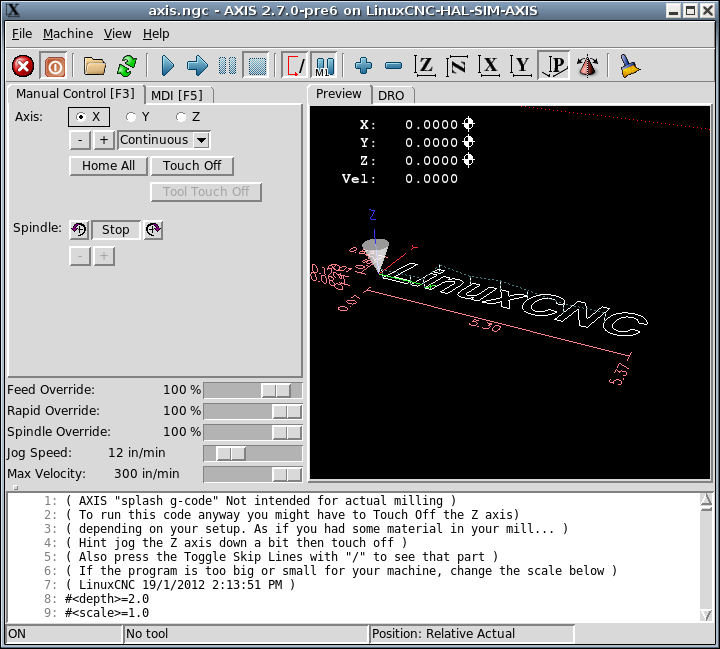
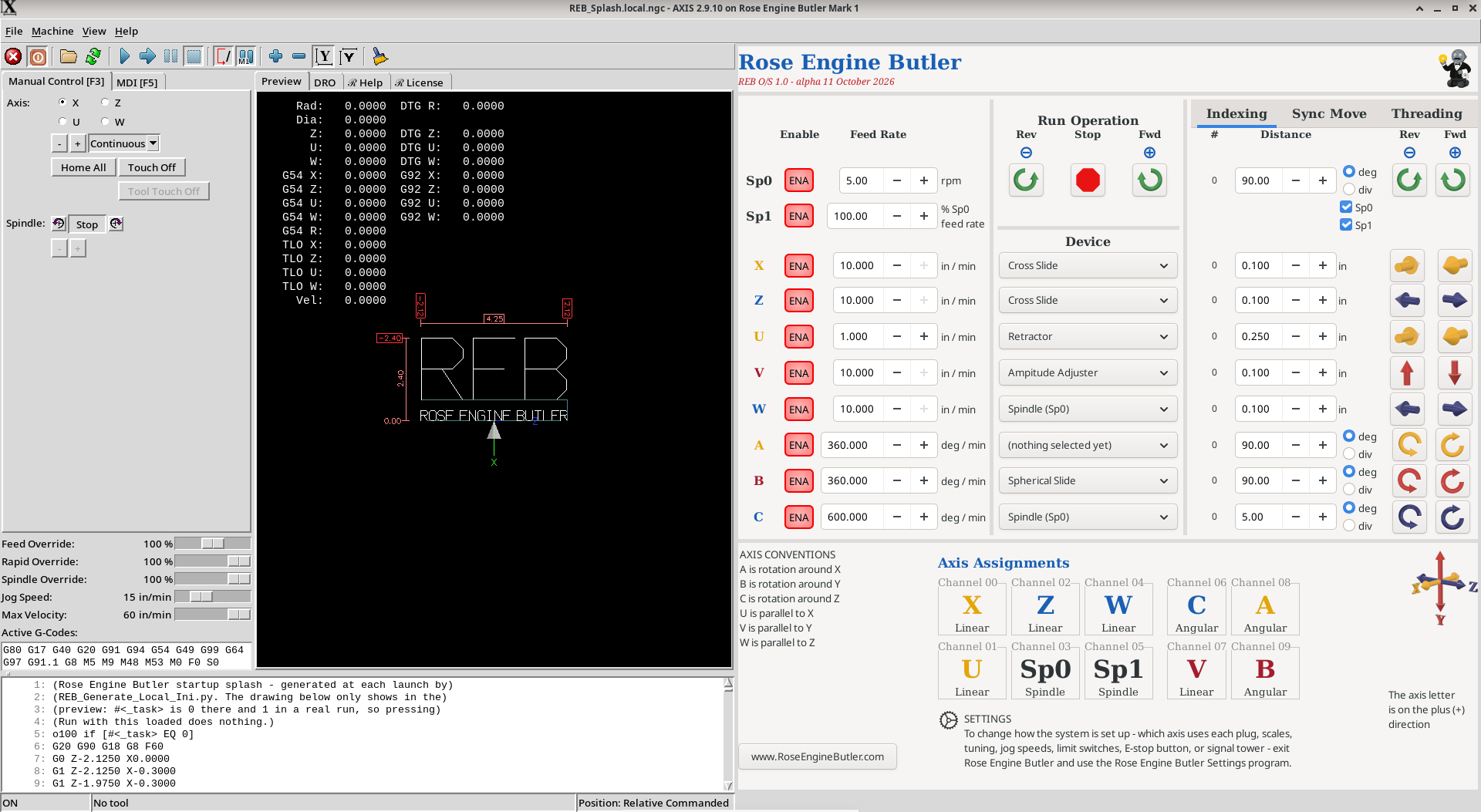
Rose Engine Butler is based on LinuxCNC with the Axis GUI. To that, we added programs and configurations which make LinuxCNC more useful for the ornamental turner. Graphically, you can see the difference in the images below.
| 
| |
| Base LinuxCNC using the Axis GUI | Rose Engine Butler (with the Expansion Box) |
Debian Linux - Both systems run on Debian Linux which is a very solid version of Linux, and which also allows for operation as a real-time operating system. Debian is an open-source software operating system developed and maintained by the Debian Project.
LinuxCNC - LinuxCNC (initially called Enhanced Machine Controller, or EMC2) was built by the U.S. National Institute of Standards and Technology in 1993 to reduce the cost for implementing an automation system for manufacturing.
- LinuxCNC implements a very powerful, standardized version of Gcode. The standard, RS274/NGC, is also defined by the International Standard, ISO 6983-1:2009. This enables you to develop your own Gcode programs and execute them on LinuxCNC.
- LinuxCNC is now an open-source software application which continues to be maintained and upgraded by a community of devotees.
More Than a Few Add-ons
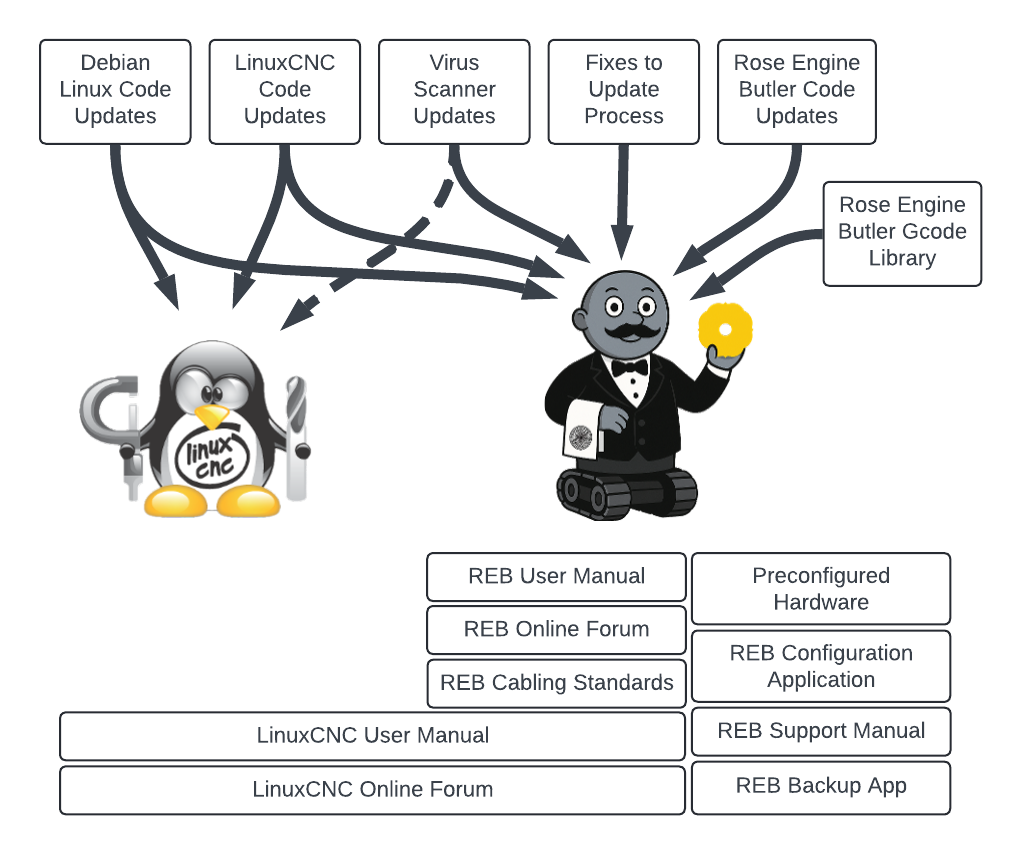
LinuxCNC’s Tux (left) and Reuben (right)
But there is more to it than that. We have tried to provide an environment for using the system which makes it easy for you to make great art.
- Debian Linux Code Updates - And as with other computer operating systems, updates are needed to Debian to keep it running.
- LinuxCNC Code Updates - also has updates over time.
- Virus Scanner Updates - LinuxCNC is considered very secure; however there are many bad players out there on the internet. We have chosen to add ClamAV to the Rose Engine Butler system as an extra measure of security. (This can be added to other LinuxCNC systems but is not by default.)
- Fixes to the Update Process - As with many operating systems, there are occasional issues encountered with the upgrade process (sudo apt update / sudo apt upgrade). When we encounter these, we add the fix for that issue into the Rose Engine Butler Upgrade program (the big green arrow) so that you do not have to research the needed actions. It may require you to run the Upgrade program twice, but the issue will be resolved for you.
- Rose Engine Butler Code Updates - We expect to provide updates over time. The Rose Engine Butler Upgrade program (the big green arrow) will pull these down to your system, and will make any updates to the on-board files for you.
And Some Bases to Help Users
- LinuxCNC User Manual - the on-line user manual for LinuxCNC is very good. It applies to the base system, and can be useful for the Rose Engine Butler user also.
- LinuxCNC User Forum - the on-line user forum for LinuxCNC is also very good. It applies to the base system, and can be useful for the Rose Engine Butler user also.
- Rose Engine Butler User Manual - the on-line user manual for Rose Engine Butler is provided for helping users of the system.
- Rose Engine Butler Support Manual - the on-line support manual for Rose Engine Butler is where we document a lot of technical details to keep those documents readily at hand.
- Rose Engine Butler User Forum - the on-line user forum for Rose Engine Butler is provided for helping users of the system.
- Rose Engine Butler Preconfigured Hardware - Being able to purchase an off-the-shelf system which you can plug in and immediately start using is a great option for the ornamental turner who does not want to get into building their own system.
- meets the application needs,
- can be sourced at reasonable costs, and
- can be provided by vendors reliably over time.
- Rose Engine Butler Cabling Standards - The standards for cabling we have selected help to reduce problems for the user, and eliminate the need to do your own research.
- Ease of use
- Secure connections (so the cables do not get accidentally disconnected)
- Sizes and types which ensure you do not plug each device into the wrong jack
- Rose Engine Butler Configuration Application - A rose engine's user needs the ability to reconfigure the system as necessary for the art to be produced. These changes can necessitate changes to the way LinuxCNC is configured. Traditionally, that was done by editing a text file, and requires a good knowledge of what to change (and what to not change).
- Rose Engine Butler Backup Application - There are a number of files you would probably hate to lose: these include your current settings, and any Gcode programs you are using. This program makes it easy to copy those files to a USB flash drive.
| spacer line |
|
eMail comments to |